Easy way to embed diagrams in emails.
All developers know, that you are very limited with data visualization when sending emails, because you can't use JS, to generate any charts/diagrams. But there is a really simple way to embed any data in your emails — you can just embed images that will be generated on your website on the fly based on the diagrams.
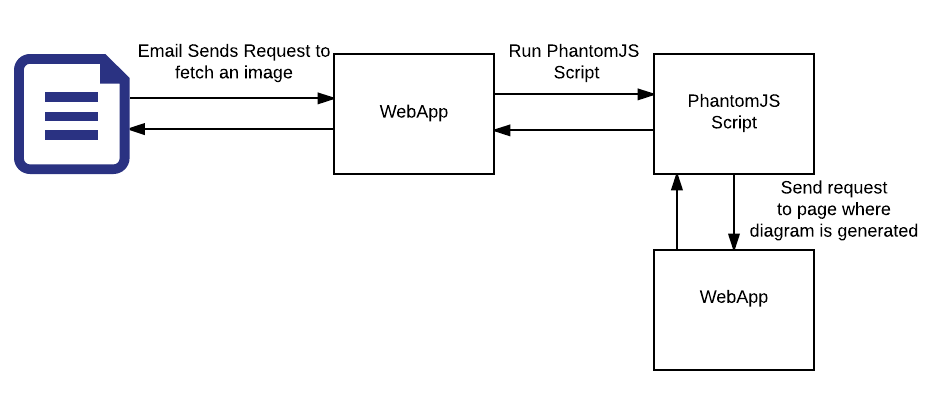
The overall idea is the following — when sending an email — use links where images will be generated on the fly. The link will send the request to your app, which will use Phantomjs to ping your endpoint for diagram generation and make a screenshot of the page and return it as base64 imge which you will return as an image response.
Lets see each one steb by step and see what happens:
- The link embeded in the email pings the webapp instead of fetching a resource right away (some parameters maybe sent as URL query parameters as well)
- The webapp runs your PhantomJS script passing it the parameters fetched from the link.
- PhantomJS pings your link with diagram passing it some parameters for diagram generation. When the page is loaded it makes a screenshot. Then it returns the screenshot as Base64 image.
- The webapp takes the Base64 image response puts the correct headersand returns the result as an image response
HTTP/1.0 200 Ok
Content-Type: image/png
Content-Length: 14580053
Here is a simple code example for PhantomJS, which is the key to understand how the whole setup works:
var webPage = require('webpage');
var system = require('system');

webPage.create().open(system.args[1], function (status) {
  var base64 = this.renderBase64('PNG');
  console.log(base64);
  phantom.exit();
});
Lets say you call the script “page_image.js”. Then if the script is in the same folder you just run
phantomjs page_image.js your-website-endpoint.com
It will take the second argument (the first one is the name of the script), and use it as an endpoint to call. Then it will call it and render a screenshot image and as base64 image and log it to the console. Then you can use it however you wish.

Comments
Post a Comment